Updated & refreshed content:
Updated & refreshed content:
Updated & refreshed content:
Updated & refreshed content:
Updated & refreshed content:
Updated & refreshed content:
Updated & refreshed content:
Updated & refreshed content:
Updated & refreshed content:
Updated & refreshed content:
Updated & refreshed content:
Updated & refreshed content:
Updated & refreshed content:
Updated & refreshed content:
Updated & refreshed content:
Updated & refreshed content:
Updated & refreshed content:
Updated & refreshed content:
Updated & refreshed content:
Updated & refreshed content:
Updated & refreshed content:
Updated & refreshed content:
Updated & refreshed content:
Updated & refreshed content:
Nether Portal Calculator
Have you ever created a Nether Portal in Minecraft and then wondered where it would open in the Overworld? Or maybe you ended up in the wrong place in the Nether? If yes, then nether portal calculator is the perfect tool for you that solves this problem in a few seconds.
While playing Minecraft, most of us get confused about the coordinates of the Nether and the Overworld. Now think about it, you have painstakingly collected obsidian blocks, activated the portal using flint and steel, but when you went to the Nether, you ended up in the wrong place. That is why tools like minecraft nether portal calculator are needed.
Key Features
• Bidirectional Conversion: Calculates both Overworld to Nether and Nether to Overworld coordinates
• Both Bedrock and Java Support: Whether you want the nether portal calculator for Bedrock or Java edition, this tool works for both
• Real-time Calculation: As soon as you enter the coordinates, the result is displayed immediately
• User-Friendly Interface: Very simple and clean design that is easy to use for any new player
• Accurate Results: Gets 100% accurate coordinates, no guesswork
• Free and Online: No download or registration required, open in browser and use
How to Use This Tool
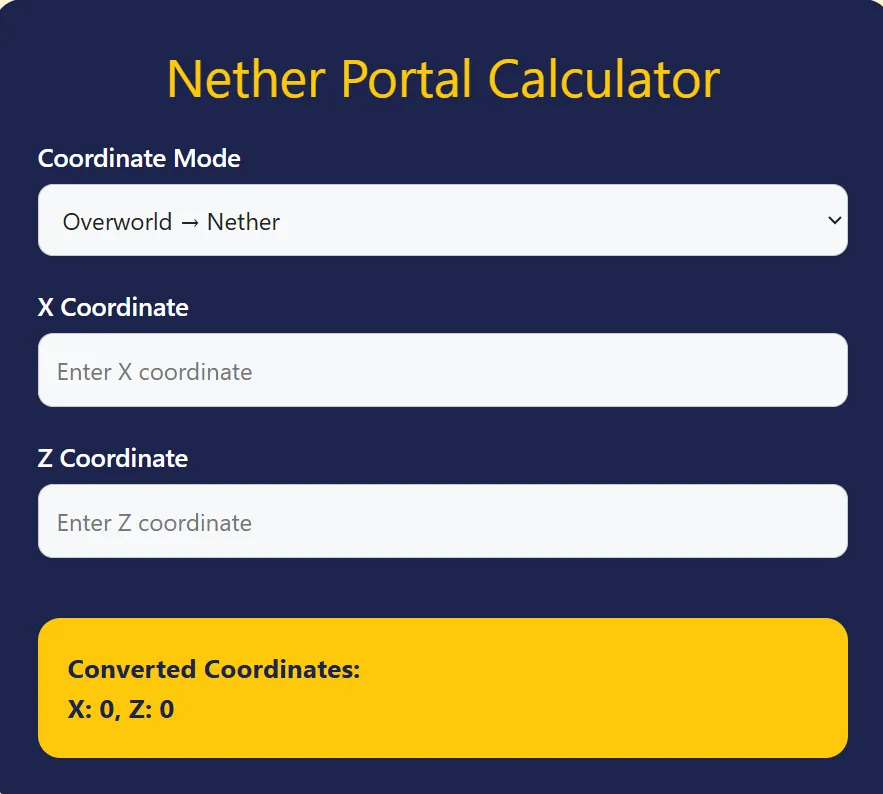
See, using this nether portal coordinate calculator is absolutely child’s play. Let me walk you through it step-by-step:
Step 1: Select Coordinate Mode
• First, select your mode from the dropdown menu
• If you are going from the Overworld to the Nether, select “Overworld → Nether”
• If you want to return from the Nether to the Overworld, change the mode
Step 2: Enter the X Coordinate
• Type the X coordinate of your current location in the “Enter X coordinate” box
• You can see your current position in Minecraft by pressing F3
Step 3: Enter the Z Coordinate
• Similarly, enter your Z coordinate in the “Enter Z coordinate” field
• Remember, the Y coordinate (height) is not needed
Step 4: See the result
• The “Converted Coordinates” will immediately appear in the yellow box below
• These are the coordinates where you should build a portal
I remember when I first used this nether portal to overworld calculator, I was really surprised by how easy it was Previously, I used to calculate manually (dividing the Overworld coordinates by 8) and often made mistakes.
Why Use This Tool
You might be wondering why you need a tool when you can calculate nether portal manually? Let me tell you:
Save time
In manual calculation, you have to remember the formula every time. Divide the coordinates by 8 when going from the Overworld to the Nether, and multiply it when coming back. This online nether portal calculator does it all automatically.
Prevent mistakes
A small mistake in math can take you somewhere else in the Nether. Maybe you would think that the difference will be only a few blocks, but in the Nether it increases by 8 times.
Perfect for Multiple Portals
If you are creating multiple portals in the overworld and the nether, then this tool is your best friend. It gives precise coordinates for each portal so that they link correctly.
For both Editions
Whether you are looking for a minecraft java nether portal calculator or for the Bedrock edition, this same tool works for both.
Use Cases
1. Base Connectivity
When your main base is in the Overworld and you want to create a safe route into the Nether. Use the Link nether portal calculator to create a portal at the exact location.
2. Resource Gathering
When you’re in the Nether for quartz, glowstone, or netherite. If you know how to calculate nether portal coordinates, the way back is easier.
3. Transportation Network
Traveling long distances in the Overworld takes a lot of time. You can get there 8 times faster than traveling through the Nether. Plan your entire network with the Mc nether portal calculator.
4. Fortress and Bastion Raids
When you’re looking for a Nether fortress or Bastion remnant and need to remember the way back.
5. Multiplayer Servers
To connect to other players’ bases on the server. Use the Where to build nether portal calculator to create a community transport system.
Personal Experience
I remember when I first started Minecraft, Nether portals were very confusing to me. Once I made a portal 1000 blocks away from my main base, but when I went into the Nether, I ended up in the wrong place on the way back. Then I had to cross lava lakes while avoiding ghast attacks to find the right portal.
Since then, I decided to learn how to calculate nether portal location properly. I used to use a calculator, but now I use these chunkbase nether portal calculator style tools that give me instant results.
The biggest advantage was that I created an entire transportation network in my survival world. Main base, village, End portal stronghold, all connected through the Nether. And believe me, this would not have been possible without the overworld to nether portal calculator.
You too should try it right now if you are serious building or exploring in Minecraft. It is truly a game-changing experience.
How to Calculate Nether Portal Travel
Although the tool does everything automatically, it is important to understand the basic concept:
• Overworld to Nether: Divide X and Z coordinates by 8
• Nether to Overworld: Multiply X and Z coordinates by 8
• Y coordinate (height) remains the same, but build at a safe height in the Nether
For example, if in the Overworld you are at X: 800, Z: 1600, then in the Nether you should build the portal at X: 100, Z: 200. This is the basic formula that the portal calculator uses.
FAQs – Frequently Asked Questions
1. Does this tool work for both Bedrock and Java editions?
Yes, absolutely! This u003cstrongu003enether portal calculatoru003c/strongu003e gives accurate results for both Bedrock and Java because the portal mechanics are the same in both versions.
2. What should I do if my portals are not linking?
First, build the portal exactly at the calculated coordinates. If the issue still persists, destroy the existing portal and recreate it in the correct location. Check again u003cstrongu003eHow to calculate nether portal travelu003c/strongu003e.
3. Can I build multiple portals close to each other?
In the Overworld, keep portals at a distance of at least 128 blocks so that they do not link to the same Nether portal. Plan this u003cstrongu003elink with the nether portal calculatoru003c/strongu003e.
4. At what height is it best to build a portal in the Nether?
Build between Y: 60-80 in the Nether. This height is safe from lava lakes and is also away from the ceiling.
5. Does the size of the portal matter for the coordinates?
No, the size of the portal can only be from 4×5 minimum to 23×23 maximum, but this has no effect on the coordinates. Each portal is calculated from the center point.
6. What to do if there is lava at the calculated location?
First clear that area or create a safe platform using obsidian blocks. Then build the portal.
7. Is this calculation possible offline?
Yes, once you understand the formula, you can do it without a calculator, but using the u003cstrongu003eonline nether portal calculatoru003c/strongu003e is more convenient and error-free.
Related Tools
If you found this nether portal calculator useful, you might also find these other Minecraft tools useful:
Conclusion
See, building a nether portal in Minecraft is easy, but linking it correctly is an art. This nether portal calculator gives you the perfection that manual calculation is not possible.
Maybe this will make your job easier – whether you are a beginner or an experienced player, this tool will save you a lot of time and resources. No more getting lost in the Nether, no more spawning in random lava pools, and no more frustration.
So what are you waiting for? Enter your coordinates, get the results, and create the perfect transportation system in your Minecraft world. Trust me, after using it once, you will wonder why you didn’t use this tool before!
Happy mining or safe travels through the Nether!
Check out latest updates & share!
Check out latest updates & share!
Check out latest updates & share!
Check out latest updates & share!
Check out latest updates & share!
Check out latest updates & share!
Check out latest updates & share!
Check out latest updates & share!
Check out latest updates & share!
Check out latest updates & share!
Check out latest updates & share!
Check out latest updates & share!
Check out latest updates & share!
Check out latest updates & share!
Check out latest updates & share!
Check out latest updates & share!
Check out latest updates & share!
Check out latest updates & share!
Check out latest updates & share!
Check out latest updates & share!
Check out latest updates & share!
Check out latest updates & share!
Check out latest updates & share!
Check out latest updates & share!