Updated & refreshed content:
Updated & refreshed content:
Updated & refreshed content:
Updated & refreshed content:
Updated & refreshed content:
Updated & refreshed content:
NJ Paycheck Calculator
Have you ever wondered how much of your hard-earned money goes to taxes? Especially when you work in New Jersey and wonder why the actual amount is so low every paycheck? Here’s the NJ paycheck calculator to help you out — a tool that tells you in seconds how much your net pay will be, after all deductions.
Key Features
• Complete tax calculations – Includes both Federal and NJ state taxes
• Different pay frequencies – Weekly, bi-weekly, monthly, for everyone
• Filing status options – Single, married, head of household
• Real-time results – See your net pay instantly
• Absolutely free – No hidden charges
• User-friendly interface – Very simple and clean
• Hourly and salaried – Suitable for both types of employees
• Accurate deductions – Social Security, Medicare, and other deductions
How to use this tool
See, this paycheck calculator nj is really easy to use. Let’s understand step by step:
Step 1: Enter Gross Income Enter your gross income in the first box. This is the amount you get each pay period, before taxes. For example, if you earn $1500 weekly, enter “e.g. 1500”.
Step 2: Select Pay Frequency Select your payment frequency from the second dropdown menu. Do you get paid weekly? Bi-weekly? Or monthly? Select whatever your situation is.
Step 3: Select Filing Status Select your tax filing status in the third option. Are you single, married, or head of household — whatever, tell us here.
Step 4: See the result! You’ll see your Net Pay in the yellow button below. This is the actual amount that will be credited to your account.
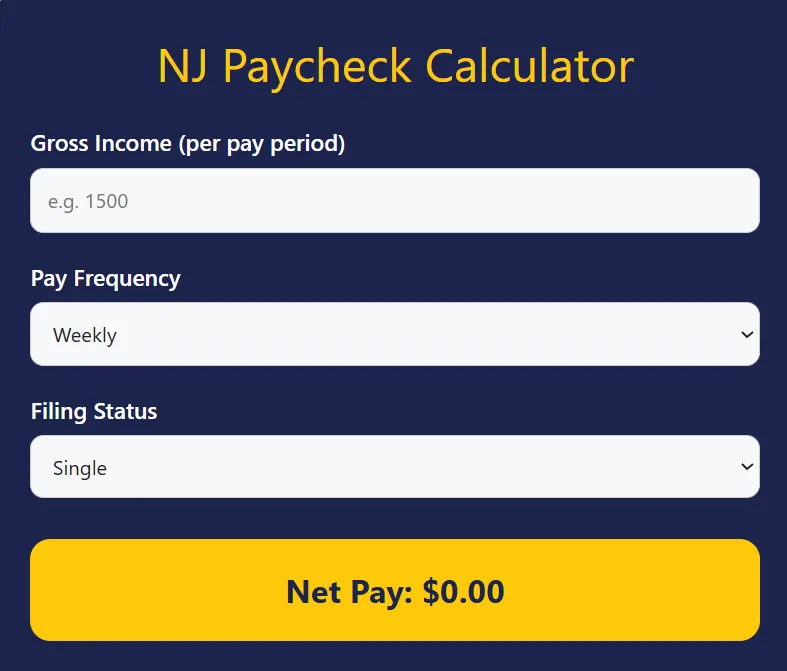
This NJ paycheck tax calculator shows you the amount after all federal taxes, state taxes, Social Security, and Medicare deductions.
Why use this tool?
Now think about it — when you get a new job offer or a raise, do you really know how much money you’ll be getting? This is where this tool comes in handy.
Differences from other calculators:
• Many generic paycheck calculator tools don’t know NJ’s specific tax rates
• This tool is updated to current New Jersey tax laws
• The interface is very clean and free of confusion
• Instant results — no lengthy forms
When you think about how to calculate taxes from paycheck nj, manual calculations can be very complicated. Federal tax brackets, NJ state tax rates, FICA deductions — all add up to a headache. But this tool handles everything automatically.
I remember when I first started working in NJ. When I saw my first paycheck, I was shocked to see the difference between gross and net! If I had had this nj paycheck calculator hourly at that time, I would have been mentally prepared.
Use cases
Who is this tool useful for? Let’s see:
For new employees: When you are joining a new job and want to know what your take-home pay will be. Especially if you are working on an hourly or weekly basis.
For job seekers: When you have multiple job offers and want to compare which one is better — based on actual net pay.
For freelancers and contractors: If you are thinking of becoming a W-2 employee, this paycheck calculator nj will give you a clear picture.
For employers: If you are a business owner and want to explain payroll to employees.
For budget planning: When you are planning monthly expenses and need to know your exact net income.
In salary negotiations: To find out the actual take-home increase when discussing a raise.
Some people use the adp nj paycheck calculator or other corporate tools, but this free option is just as accurate.
My personal experience
I remember when I moved from New York to New Jersey. You would think that the paychecks would be about the same, but the tax structures of the two states are very different. I used the NY paycheck calculator once and then the NJ one — and was amazed at the difference.
Now whenever a friend or colleague asks about a salary negotiation or job offer, I first tell them to use the NJ paycheck calculator. Because the joy of hearing gross salary, the real reality is in the net pay.
Once a junior colleague told me that he had received an offer of $60,000 per year. He was very excited. I said, first, look at the calculator to see how much you would get on a bi-weekly basis. When he calculated, he got a realistic picture and planned his budget accordingly.
Maybe this will work for you too — try it today!
Frequently Asked Questions
Q1: Is this calculator accurate?
Yes, it calculates according to current NJ tax laws and federal rates. However, if you have additional deductions (like 401k, health insurance), you will have to manually account for them.
Q2: Can I use it for hourly wages?
Absolutely! This NJ paycheck calculator works perfectly as an hourly one. Simply multiply your hourly rate by the hours in the pay period and enter it in the gross income field.
Q3: How does filing status affect your tax bracket?
Filing status determines your tax bracket. Single filers generally pay more tax than married filing jointly.
Q4: Are there local taxes in NJ?
Most municipalities in New Jersey do not collect local income taxes, but some cities may. This tool is primarily for state and federal taxes.
Q5: What deductions are included in net pay?
Federal income tax, NJ state tax, Social Security (6.2%), and Medicare (1.45%) are automatically calculated.
Q6: Is this tool free?
Yes, it is completely free and can be used unlimited times.
Q7: What if I work in NY but live in NJ?
In that case, you will have a special tax situation due to the reciprocal agreement. In such cases, it is best to consult a tax professional.
Related tools
If you found this tool useful, try this too:
Dave Ramsey Investment Calculator
Commercial Business Loan Calculator
401(k) Contribution Calculator
window installation cost calculator
window replacement cost calculator
Extended Warranty Refund Calculator
Check out latest updates & share!
Check out latest updates & share!
Check out latest updates & share!
Check out latest updates & share!
Check out latest updates & share!
Check out latest updates & share!